Cleanup Local Branches
/cleanup-local-branchesAudit merged or abandoned branches, keep the active ones, and delete the rest — without touching remote history.
Productivity skills for Claude Code and Cursor — Git workflows, code review, and session wrap-up. Each entry opens its skill in the ai-tools repository.
Short, keyboard-friendly playgrounds for cleanup and relocating uncommitted work. Readable at a glance — interaction is optional.
/cleanup-local-branchesAudit merged or abandoned branches, keep the active ones, and delete the rest — without touching remote history.
/move-diffRelocate an uncommitted working tree onto a different branch when the work landed on the wrong one.
Uncommitted on feature/login
3 uncommitted changes on feature/login. Choose a branch and move them.
Concise, optimized walkthroughs for peer review and rebase-after-squash — playable frames with a full transcript, pause by default when you prefer reduced motion.
/loop /peer-reviewCross-provider review → triage → fix → commit, then push when clean. Pair with /loop to converge.
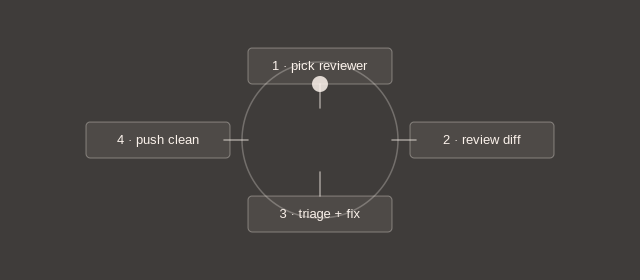
Pick the other provider as reviewer
$ /loop /peer-review
→ last commit by Codex → Claude reviews
→ last commit by Claude → Codex reviews
1. Pick the other provider as reviewer
$ /loop /peer-review
→ last commit by Codex → Claude reviews
→ last commit by Claude → Codex reviews
2. Review the branch diff independently
Round 1 · high effort
Scope: origin/main...HEAD
Findings: P1×1  P2×2  P3×0
3. Triage and apply mechanical fixes
Apply P1/P2 that are local and clear
Commit: fix: address peer-review round 1
Leave judgment calls for the human
4. Converge, then push and notify the PR
Round 2 · VERDICT: clean
git push && gh pr comment
“Reviewed clean in 2 rounds”
/rebase-after-squashWhen a parent branch was squash-merged, replay only your new commits with rebase --onto — not a plain rebase onto main.
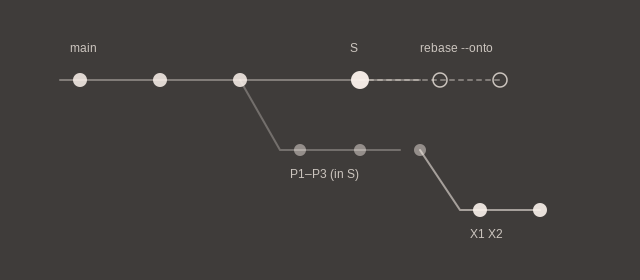
Parent was squash-merged into main
main:   A─B─C──────S
parent:      P1─P2─P3  (inside S)
yours:              X1─X2 ← HEAD
1. Parent was squash-merged into main
main:   A─B─C──────S
parent:      P1─P2─P3  (inside S)
yours:              X1─X2 ← HEAD
2. Plain rebase replays the squashed commits
$ git rebase main
Replaying P1… conflict (already in S)
Replaying P2… conflict (already in S)
3. The skill helper finds a reliable OLD_BASE
# skills/rebase-after-squash/scripts/find-rebase-base.sh
→ prints ONTO=… OLD_BASE=<P3> NEW_COMMITS=2
Patch-id match, or gh PR tip if ambiguous
4. rebase --onto replays only what is new
# using ONTO + OLD_BASE from the helper
git rebase --onto <ONTO> <OLD_BASE> HEAD
main: A─B─C─S─X1′─X2′  ·  no self-conflicts
/loop /peer-reviewRun Codex review locally, apply findings, push and notify the PR
/cycle-review-prTrigger fresh reviews until the PR passes
/babysit-prResolve existing review threads until the PR is quiet
/cleanup-local-branchesAudit and remove merged or abandoned branches
/wrapup-reposFinish loose ends in the current repo before closing out
/move-diffRelocate uncommitted changes to a different branch
/screenshot-prCapture and embed visual changes in the PR
/rebase-after-squashRebase cleanly when a parent branch was squash-merged
/resolve-conflictResolve merge or rebase conflicts with guidance
/folio-datadog-hygieneWeekly Datadog hygiene review for Folio (successor to Datadog Tofu Sync)
/close-outFile follow-ups and wrap up the session
/linear-ticket-genFile feedback and bug reports as Linear tickets
/create-prOpen or update a draft PR from the branch diff vs base
/refresh-prRewrite a stale PR title and body from the current diff
/pick-upResume a prior session from its handoff note
/handoffSummarize state and continue work in a fresh session
/fix-stale-docsFind and repair docs that no longer match the code